CAD File Management Software
Conquer CAD chaos and keep drawings in sync
Control your drawings, xrefs and sheet sets simply. Streamline title block updates and have access to a clear history/version control of your files. Enjoy faster data transfers for smoother collaboration.






Fill in the form to get the eBook and learn how smarter CAD file management can improve productivity and reduce project risk. See how 12d Synergy can help.

Why CAD workflows break down at scale
When projects grow, manual CAD management methods don’t scale well. Small errors can turn into major rework.


Billable hours get burned updating drawing with registers, spreadsheet and lisp routines that require opening DWGs one by one.

Time gets lost rebinding hundreds of Xrefs when references break.

Naming and folder rules are not adhered to, causing batch commands and macros to fail.

No reliable history makes it harder to prove what was issued and when if disputes arise.
CAD file control that keeps
teams moving
12d Synergy streamlines CAD file management by automating the tedious parts of drawing control and keeping everyone aligned on the latest set. Reduce tileblock admin, eliminate avoidable Xref breakage, and maintain an auditable record of changes as projects evolve.
Streamline updates to title block information in your drawings without opening any DWG files, reducing update time by up to 90%.
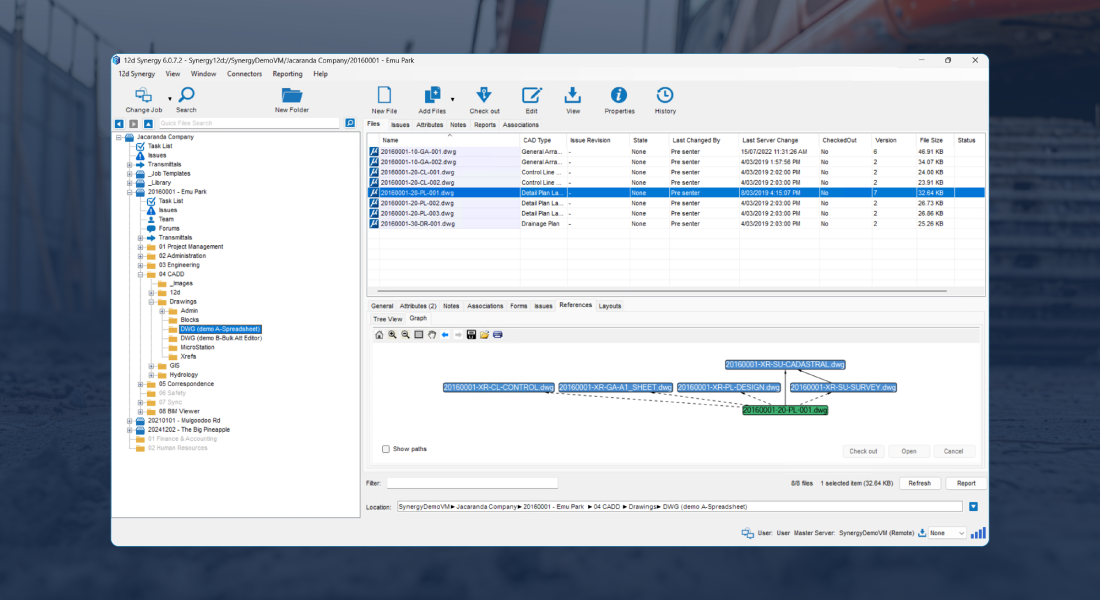
Rename or move DWGs without breaking Xref links as 12d Synergy intuitively recognizes the link between your drawings.
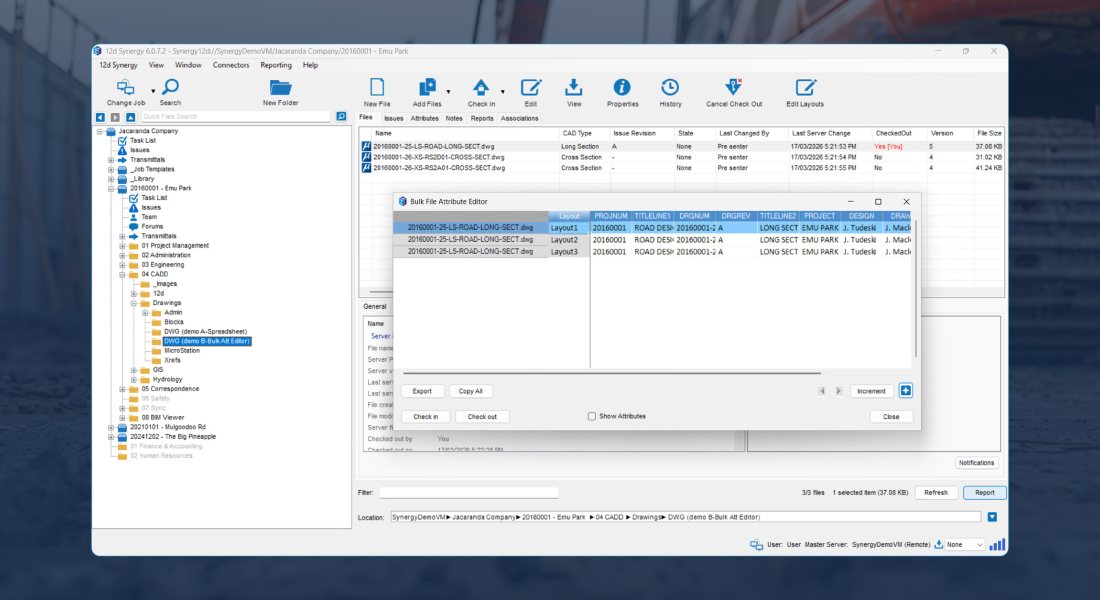
Streamline Attribute management via Excel spreadsheets – push out attribute updates from a spreadsheet to an entire set of plans without having to open any drawings.
Manage your sheet sets with a check-in/check-out system – Keep everyone working on the same, most up-to-date page.
Easily import and edit attributes on drawing Layouts directly from 12d Synergy using our Layout Editor.


Collaborate with confidence across offices and remote teams
Keep CAD deliverables controlled with enforced naming and filing rules, a single source of truth, and clear version history.
Teams can find the right file faster, reduce duplication, and keep batch routines running reliably.
Enforce naming and filing rules so drawings are consistently structured and batch routines run reliably.
Track who changed what and when with a complete audit trail, giving you the peace of mind of easy rollback.
Lockdown CAD work processes with the Workflow Engine* so key steps don’t get skipped.
*add-on
Built-in controls for CAD at scale
Reduce admin time, prevent errors, and keep drawing sets consistent across teams and offices.
Title Block Updates
Update title block information across drawings without opening each DWG, reducing manual errors.
Xref Integrity
Rename or move drawings without breaking Xrefs, so teams spend less time rebinding references.
Sheet Set Control
Use check-in/check-out to keep sheet sets controlled and reduce “who changed what” confusion.

Bulk Editing
Select groups of DWGs and update attributes in bulk through spreadsheet-based workflows without opening drawings.

Audit Trail
Track who changed what and when, with rollback potential for safer collaboration and QA.

Faster Transfers
Work locally with a central point of truth. Transfer only what changed to reduce network strain and speed up collaboration.


Seamless integration across your technology stack
Integrate your core systems into an open, data-agnostic environment, so project information flows consistently without vendor lock-in.
How teams use CAD file management
Draft more efficiently with fewer interruptions
Spend less time maintaining separate registers and broken references. Keep drawings current with bulk updates, reliable Xrefs and fast access to the latest files.
See howReduce coordination rework
Keep drawing sets controlled and traceable, with clear history and fewer version conflicts across disciplines.
See howKeep deliverables defensible
Maintain a complete record of issued drawings with audit trails and version history, improving QA and reducing risk during handover.
See how


Fill in the form to get the eBook and learn how smarter CAD file management can improve productivity and reduce project risk. See how 12d Synergy can help.
Customer Success Stories

Frequently Asked Questions