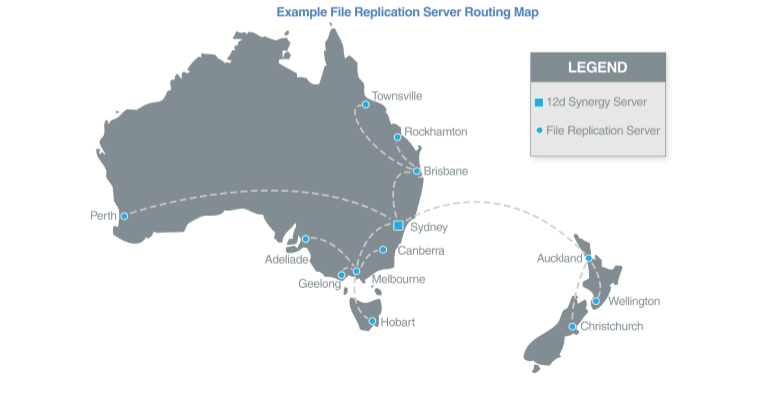
File Replication Servers: The Technical Engine Behind Worksharing
If you’ve read our guide to worksharing across multiple offices, you already know the biggest obstacle to distributed AEC teams isn’t willingness — it’s data. This article goes one layer deeper into a specific tool that solves a specific version of that problem: the File Replication Server (FRS).
Make project information easier to manage with 12d Synergy.
From documents and drawings to emails, models and workflows, 12d Synergy brings everything together in one secure system so your team can work more efficiently from day one.
Book a DemoWhat a File Replication Server actually does
In a regional or global worksharing environment, a large amount of traffic runs between your offices every day. A File Replication Server reduces that traffic by synchronising and caching files locally, in the background, before anyone needs them.
Practically, that means when your team arrives at their desk, the files they need are already sitting on the local network — nobody’s waiting on a transfer across the internet to start their day.

Why Intelligent Data Transfer alone isn’t always enough
You can already workshare with 12d Synergy without an FRS. If you have offices in, say, Brisbane, Sydney and Melbourne, your team can access data from any of those offices, and Intelligent Data Transfer keeps bandwidth use down by delivering only the changes people actually need.
The gap shows up when multiple people in the same office want to view the same data. If five people in the Brisbane office all open the same version of a 12d Model project for the first time, all five are individually delivered the same set of changes — even though it’s the same data, going to the same physical location, five separate times.
That’s exactly the inefficiency an FRS is built to eliminate.
How synchronisation works
Synchronisation between your 12d Synergy master server and a remotely located FRS can run on demand — the moment a user requests a file — or on a scheduled basis you control. You set the rules: which file types sync, how often, and under what conditions.
Large files that don’t need to be current to the minute, like ECW files, can be scheduled to transfer overnight rather than competing for bandwidth during the workday.
Where an FRS makes the biggest difference
Rather than everyone independently downloading the same large file the first time they open it, the FRS pushes it to the local network once, and everyone pulls from there.
Sites with large, static reference data.
Big ECW files or similar reference datasets can be pre-populated onto a remote office’s FRS ahead of time, so nobody’s waiting on that first download.
Low-bandwidth or temporary site offices.
If a team is working from a site office with a poor connection, the FRS can handle transfers during downtime or when the office isn’t actively in use, so people aren’t stuck waiting on data when they need to be working.
Is an FRS the right next step for your setup?
As a general rule: the more offices you have, and the more people at each site working from the same large datasets, the more an FRS pays for itself in saved time and reduced network strain. A single small office with light data needs may get everything it needs from Intelligent Data Transfer alone.
If you’re weighing this up for your business, speak with our team about what your data footprint looks like across offices — it’s usually a quick conversation to work out whether an FRS is worth the setup.

12d Synergy
Common Data Environment
Make project information easier to manage with 12d Synergy.
From documents and drawings to emails, models and workflows, 12d Synergy brings everything together in one secure system so your team can work more efficiently from day one.
Book a Demo