From Clipboard to CDE: How 12d Synergy Forms Closes the Field Data Gap
It’s early on a site visit. An inspector is checking a manhole, clipboard in one hand, phone in the other. They jot a result on a paper form, snap a photo that lands somewhere in a camera roll already full of unrelated shots, and move on to the next one.
By the time they’re back in the office, the form needs to be scanned, the photo needs to be found and matched to the right inspection, and someone has to type it all into the system that actually manages the project.
Multiply that by every inspection, every hazard report, every daily log on every job, and you’ve got a fairly accurate picture of how most information still moves on a construction site.
Make project information easier to manage with 12d Synergy.
From documents and drawings to emails, models and workflows, 12d Synergy brings everything together in one secure system so your team can work more efficiently from day one.
Book a DemoAcross the life of a project, forms are the primary mechanism for project tracking, safety management, and quality assurance, used by everyone from field crews to site managers to document controllers. And despite a clear industry-wide shift toward digital workflows, physical forms remain stubbornly common on-site; particularly anywhere a legally binding signature is required, for site inspections, and for daily field logging, where paper is still often seen as the path of least resistance.
That persistence comes at a cost, and it shows up in a few very specific ways.
Where Paper Actually Costs You
Safety management slows down exactly when it shouldn’t.
A 2026 industry analysis found a superintendent completing a daily safety walk in 10–15 minutes using a mobile data capture tool, compared to roughly 45 minutes on paper plus office re-entry for the same observations (ABC of the Carolinas, 2026). A hazard that should trigger action in minutes instead sits in a notebook until someone gets back to the trailer.
Quality and inspection data gets captured but doesn’t get used.
Industry research from FMI puts this in stark terms: roughly 95% of the data captured across construction and engineering projects goes unused (FMI, via For Construction Pros). It’s rarely a collection problem as site teams fill out plenty of inspection and QA forms. The problem is that paper records and disconnected app data don’t make it back into the system that’s meant to be the project’s single source of truth.
Project tracking absorbs the cost of chasing down what should already be on file.
PlanGrid and FMI’s landmark Construction Disconnected study found that non-optimal activities — hunting for project information, resolving conflicts, and fixing mistakes — cost the U.S. construction industry more than $177 billion a year in labor, with project teams losing close to 5.5 hours a week just searching for data they should already have (PlanGrid & FMI, 2018). Closer to home, 28% of UK construction firms name a lack of accessible on-site information as the single biggest factor limiting their productivity (Autodesk + FMI).
And when the data is wrong or missing, rework follows.
Poor data and miscommunication drive 48% of all rework in U.S. construction, worth over $31 billion a year, and Autodesk and FMI’s global research puts bad data behind roughly $88.7 billion in avoidable rework worldwide (Autodesk + FMI).
Four different problems — safety, quality, tracking, rework — but the same root cause: forms that capture good information in a format the rest of the project can’t easily use.
12d Synergy Forms: Built into the Environment
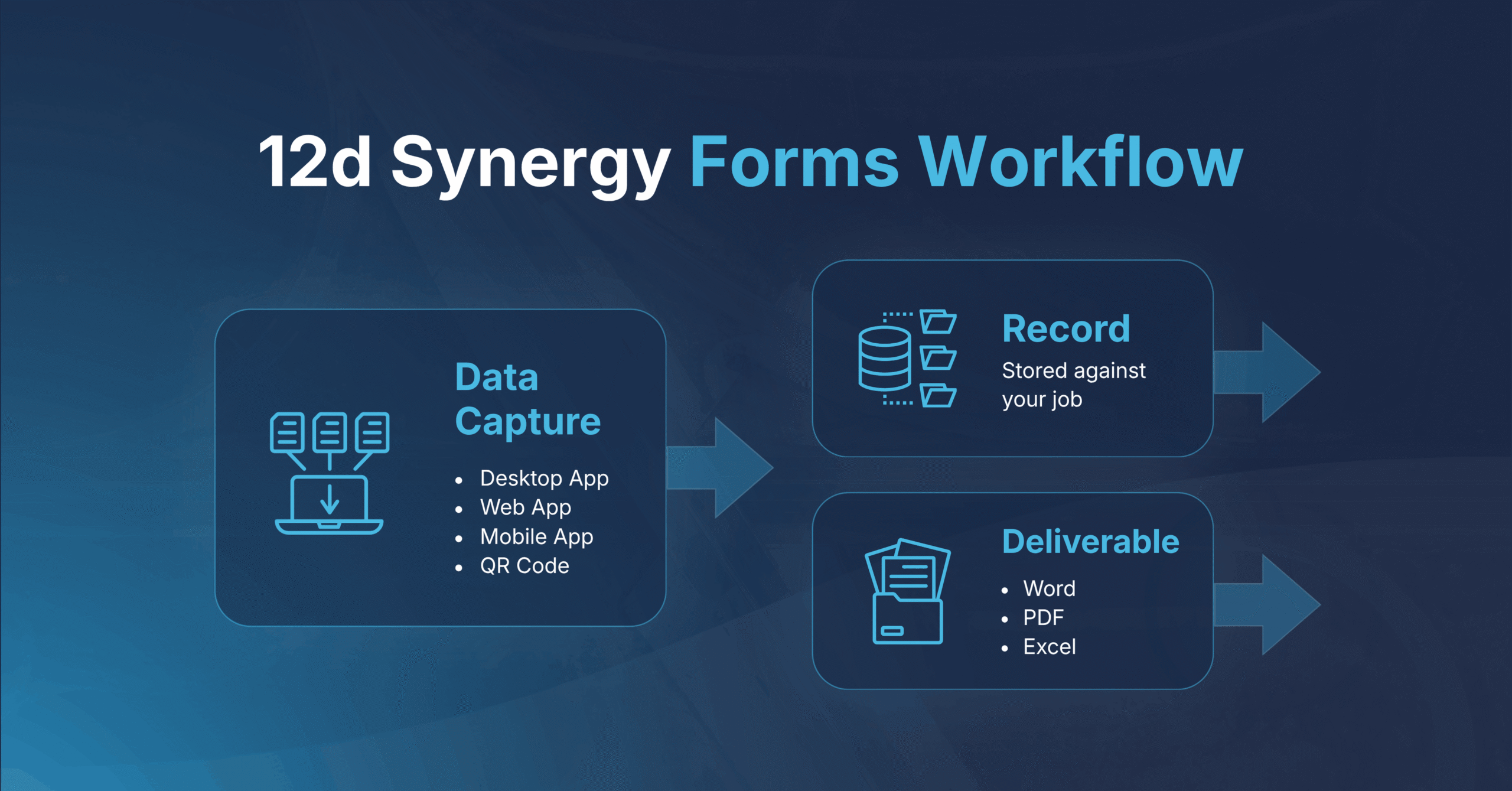
This is the specific problem that 12d Synergy Forms is built to close. Rather than functioning as a separate app that teams have to remember to sync back to the project record, Forms sits inside the same Common Data Environment (CDE) that already manages your files and models so information captured on-site lands directly in the project it belongs to, the moment it’s submitted.
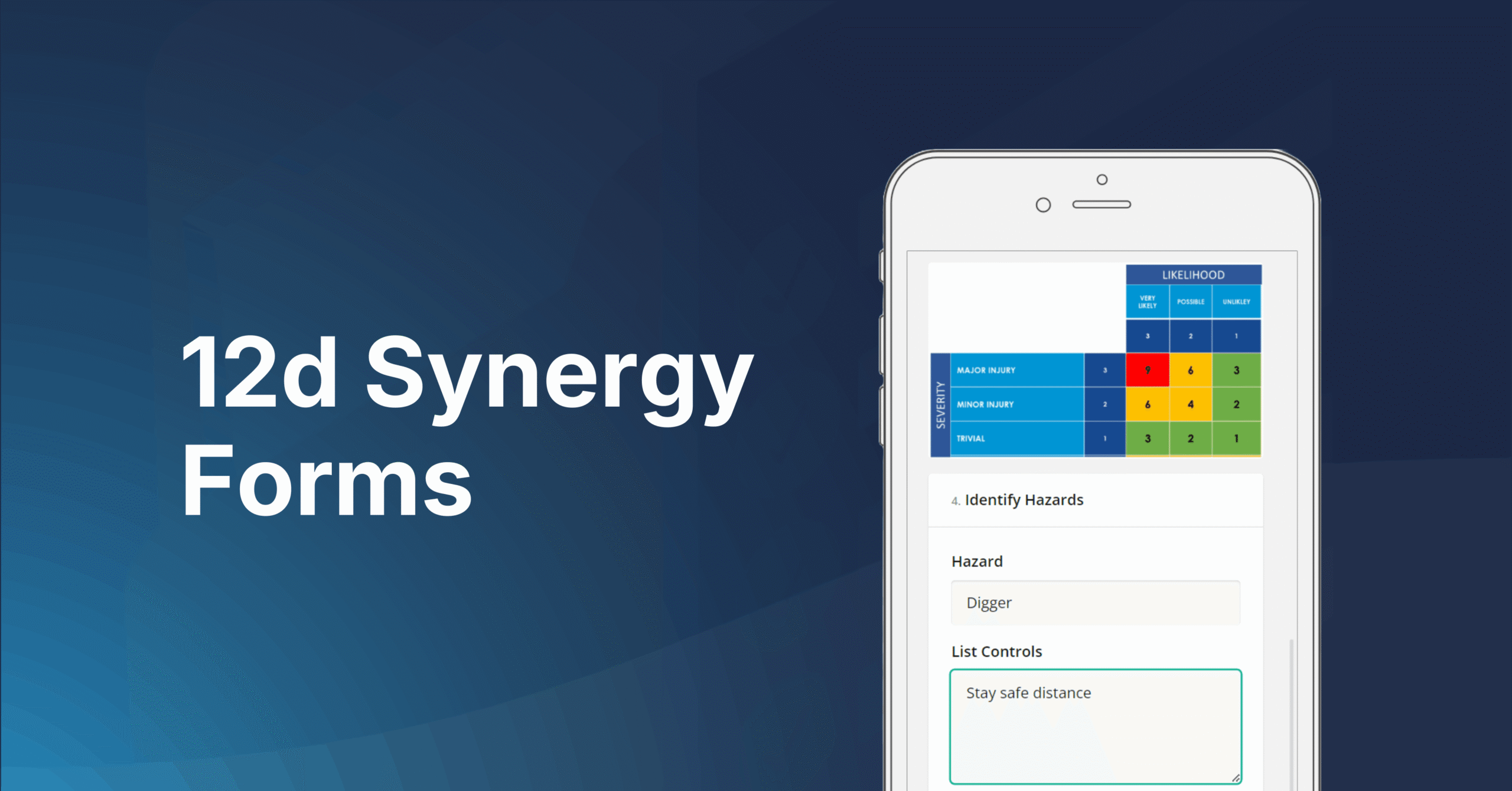
Each job has its own Forms tab, showing every form filled out by every user, alongside a “My Forms” view for an individual’s own submissions. Forms can be started directly from a job, triggered as part of a task, or built into a workflow, and because the experience is responsive across phone, tablet and desktop, the same form looks right whether it’s filled out at a desk or on a muddy site.
A few capabilities do most of the heavy lifting:
- Field types built for the field. Standard text fields sit alongside Synergy-aware fields — contact pickers, job pickers, address fields and file pickers — plus conditional logic, so a “fail” answer can trigger a follow-up comment field that a “pass” never shows.
- Photos straight from the camera. Users can capture a photo directly into the form from their phone, skipping the camera-roll shuffle entirely.
- Dynamic, repeatable fields. For anything that can’t be anticipated in advance — like a variable number of on-site hazards — a dynamic field lets users repeat a set of questions as many times as needed.
- Save and resume. Forms don’t have to be completed in one sitting, which matters for anything built up across multiple site visits.
- Flexible outputs. A form fill can simply live as a record, or generate a Word, PDF, or Excel output, including registers that compile multiple form fills into a single running file. Output templates can carry company branding globally or be tailored per form, and answers can automatically name and file the output in the right project folder.
- Permissions and reuses. Forms can be set globally, scoped to a specific job, or bundled into job templates, so the right forms are available automatically when a new job starts.
Digital Form and Where They Earns Their Place on a Project
The flexibility of Forms means it tends to get adopted gradually, one workflow at a time. A few of the most common starting points:
Site and quality inspections. A field-based inspection — a manhole, a structure, a piece of installed work — captured with photos, pass/fail logic, and follow-up comments, producing a Word or PDF report named automatically from the inspection’s own answers.
Health, safety and hazard management. Mandatory forms attached to tasks (so a job’s health and safety form is assigned the moment it starts), risk matrices users can reference while filling out the form, dynamic hazard registers that grow as new hazards are identified, and signature fields that pull a user’s saved signature automatically.
Design and model review workflows. A self-review form required before a model or document can move from “work in progress” to “approved to share”, so reviewers aren’t spending time on checks the originator should have already done. Form answers can attribute the output (pass/fail, reviewer, outcome), making it easy to filter and report on review history across a large project.
Site inductions and high-frequency forms. A QR code generated for a form means anyone arriving on-site can scan and complete an induction on their own phone, with no app login required.
Survey request forms. When survey requests start their life in 12d Synergy, they’re immediately part of the project record managed by the survey manager, linked to relevant files, and available to be incorporated into tasks and workflows for further automation. Survey managers can review form fills for completeness and request additional information directly, keeping the whole process in one place rather than chasing it across emails or spreadsheets.
Workflow automation triggered by form content. A form fill can act as the trigger for a workflow step, and the answers within it can become conditions — for example, only notifying a health and safety manager by email if a logged risk score crosses a defined threshold.
Who Benefits, and How
Site engineers and field crews get a faster, mobile-first way to capture information without juggling paper, a separate app, and Synergy at the same time — and one less thing to remember to do back at the office.
HSEQ and safety managers gain hazard registers and inspection records that are auditable by design: every form fill is timestamped against the job, recording exactly who completed it, when, and what they entered.
Digital engineers and information managers get field data that flows straight into the same CDE as the rest of the project record, supporting the kind of structured, ISO 19650-aligned information management that’s increasingly expected on infrastructure and engineering projects.
Document controllers and reviewers can build review and approval steps directly into existing workflows, with self-review checks reducing the volume of avoidable issues reaching a formal approver.
Project managers and leadership get registers and reportable data — pass/fail rates, review outcomes, risk scores — without having to chase it down manually, because it was structured at the point of capture rather than reconstructed afterwards.
Forms is one of the most versatile features in 12d Synergy, and most teams find new ways to use it well beyond their first workflow.
To see it in action, watch the on-demand session ‘From Paper to Connected: Modernising On-Site Data Capture with 12d Synergy Forms’, or head to our Knowledge Base for full setup guides, field type references, and step-by-step instructions on building your first form.

12d Synergy
Common Data Environment
Make project information easier to manage with 12d Synergy.
From documents and drawings to emails, models and workflows, 12d Synergy brings everything together in one secure system so your team can work more efficiently from day one.
Book a Demo